DATEV export (Document package, Booking batch & Master data)¶
Deutsch: DATEV-Export
The DATEV export plugin (datev.jar, version 2.0.0, requires OpenYaBS 2.0.23+) provides three DATEV-compliant exports from the Journal for DATEV Unternehmen online and DATEV Kanzlei-Rechnungswesen:
- DATEV-Belegpaket (ZIP – Unternehmen online, mit E-Rechnungen) – DATEV XML-Schnittstelle online (version 6.0) for Belege online / DATEV Belegtransfer with posting metadata and original invoice files (PDF/ZUGFeRD or XRechnung). Requires no consultant or client number.
- DATEV-Buchungsstapel (EXTF-CSV – Kanzlei-Rechnungswesen) – DATEV-Format EXTF, header version 700, format category 21, format version 13 (125 columns), including automatic integration into the tax-adviser ZIP package.
- DATEV-Stammdaten Debitoren/Kreditoren (EXTF-CSV – Kanzlei-Rechnungswesen) – DATEV-Format EXTF, header version 700, format category 16, format version 5 (51 columns).
Installation¶
- Import
datev.jarfrom theplugins/folder of the OpenYaBS distribution (oropenyabs-plugins-<version>.zip) via Settings › Plugins › Import plugin (requires OpenYaBS 2.0.23 or newer). - Import a chart of accounts (if not done yet) via Settings › Accounts › Import using the updated files in
ext/: ext/accounts-german-skr03.xml– SKR03 (cleaned up: outdated 16 % accounts removed, German UStVA field numbers updated, e.g. 81 instead of 51, GWG account0480properly labeled),ext/accounts-german-skr04.xml– SKR04.
Settings¶
Accessible via Settings › Plugins › DATEV-Export, directly via Plugins › DATEV: Einstellungen öffnen, or via the Settings… button inside any DATEV export preview dialog. All values are stored per database under the datev.* prefix; if settings have not been saved yet, exports automatically use the defaults for the detected chart of accounts and show a reminder in the export dialog.
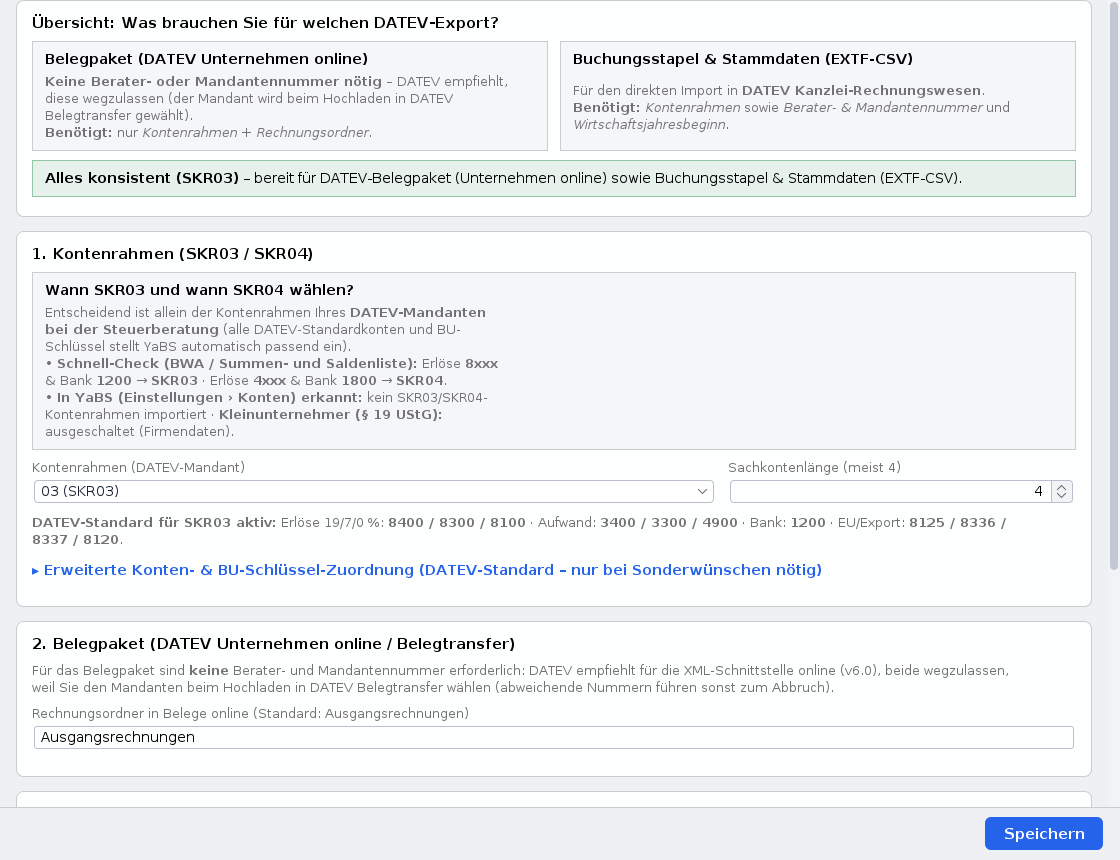
The settings page is organized into three clear sections and validates input immediately on save:
- Overview & consistency check:
- Clearly distinguishes what is needed for the Document package (Unternehmen online) (chart of accounts + invoice folder only; no consultant or client number) versus Booking batch & Master data (EXTF-CSV) (consultant number, client number, fiscal year start).
- SKR03/SKR04 consistency check: automatically detects the chart of accounts imported in YaBS, shows whether the small business VAT exemption (§ 19 UStG) is enabled in company settings, and immediately warns about mixed SKR03/SKR04 accounts (both on the settings page and in the export preview dialogs).
- 1. Chart of accounts & account mapping:
- Chart of accounts (Kontenrahmen) (
SKR03orSKR04, prefilled from imported accounts). Switching between SKR03 and SKR04 automatically updates the standard DATEV accounts. - Advanced account & BU tax key mapping (collapsed by default unless customized):
- Money accounts: income and expense money accounts (default
1200for SKR03,1800for SKR04), plus an optional cash account (e.g.1000/1600) for cash register (POS) sales. - Automatic accounts & BU tax keys: Export DATEV automatic accounts (AM/AV) without BU key (enabled by default), plus a dedicated field for client-specific automatic accounts. The BU key is omitted strictly for official DATEV AM/AV automatic accounts (in SKR03/SKR04, e.g.
8400/8300/3400/3300or4400/4300/5400/5300) and any configured client-specific automatic accounts. Regular non-automatic accounts (e.g. SKR034930office supplies,4600advertising,0480GWG) always emit the appropriate BU key (9/8for 19 %/7 % expenses,3/2for 19 %/7 % income). - Accounts for 0 % sales by VAT category & small business exemption (§ 19 UStG): The category is taken from the line items' tax rate (customer rate, product rate, or default tax rate):
- Tax-free domestic sales (0 %, no special category / category
E):8100(SKR03) or4100(SKR04). When the small business VAT exemption (§ 19 UStG) is enabled in company settings (Small business VAT exemption),8195(SKR03) or4185(SKR04) is used automatically without a BU key. - 0 % EU delivery account (category
K, intra-community supply, § 4 Nr. 1b UStG):8125(SKR03) or4125(SKR04). - EU services, reverse charge (category
AE, customer with a VAT ID of another EU country, § 3a Abs. 2 UStG):8336or4336(UStVA line 21, not line 41). - § 13b UStG domestic reverse charge (category
AEwithout an EU VAT ID):8337or4337. - Exports outside the EU (category
G, § 4 Nr. 1a UStG):8120or4120. - Invoices with mixed 0 % categories are split cleanly by category. For 0 % EU sales, the contact's EU VAT ID (including
GR→ELnormalization for Greece) is written to column 40 (EU-Land u. UStID) for the EC sales list. - Accounts & BU keys per tax rate: fallback revenue and expense accounts and BU keys per tax rate, with a Defaults from chart of accounts button.
- Money accounts: income and expense money accounts (default
- 2. Document package (DATEV Unternehmen online):
- Invoice folder in Belege online (default:
Ausgangsrechnungen). - 3. Booking batch & Master data (EXTF-CSV for Kanzlei-Rechnungswesen):
- Consultant number (Beraternummer) (
1001–9999999) and client number (Mandantennummer) (1–99999). - Fiscal year start (Wirtschaftsjahresbeginn) (
YYYYMMDD, e.g.20260101) – supports deviating fiscal years (e.g.20250701) without false cross-year warnings; invalid calendar dates are validated. - Account length (Sachkontenlänge) (
4–8, typically4) – class-0 accounts (e.g.0480,0670) are properly left-padded with leading zeros; account numbers exceeding the configured length are reported as errors. - Batch label (Bezeichnung) (max 30 chars), optional initials (Diktatkürzel) (empty, 2, or 4 uppercase letters, e.g.
ABorABCD– per DATEV EXTF specification field 18, a single letter is invalid and omitted), lock on import (Festschreibung) (off by default so the tax adviser can review before locking). - Document date mode: Payment date (cash basis / EÜR) (default) or Document date (invoice date).
- Export date of service / tax period (columns 115–116, § 14 Abs. 4 Nr. 6 UStG): enabled by default. Whenever the delivery/service date differs from the booking date, both Leistungsdatum (
DDMMYYYY) and the tax period assignment date are exported for clean period cutoffs and VAT rate transitions.
1. DATEV document package (ZIP – Unternehmen online, with e-invoices)¶
Available via Journal › Export › DATEV-Belegpaket (ZIP – Unternehmen online, mit E-Rechnungen).
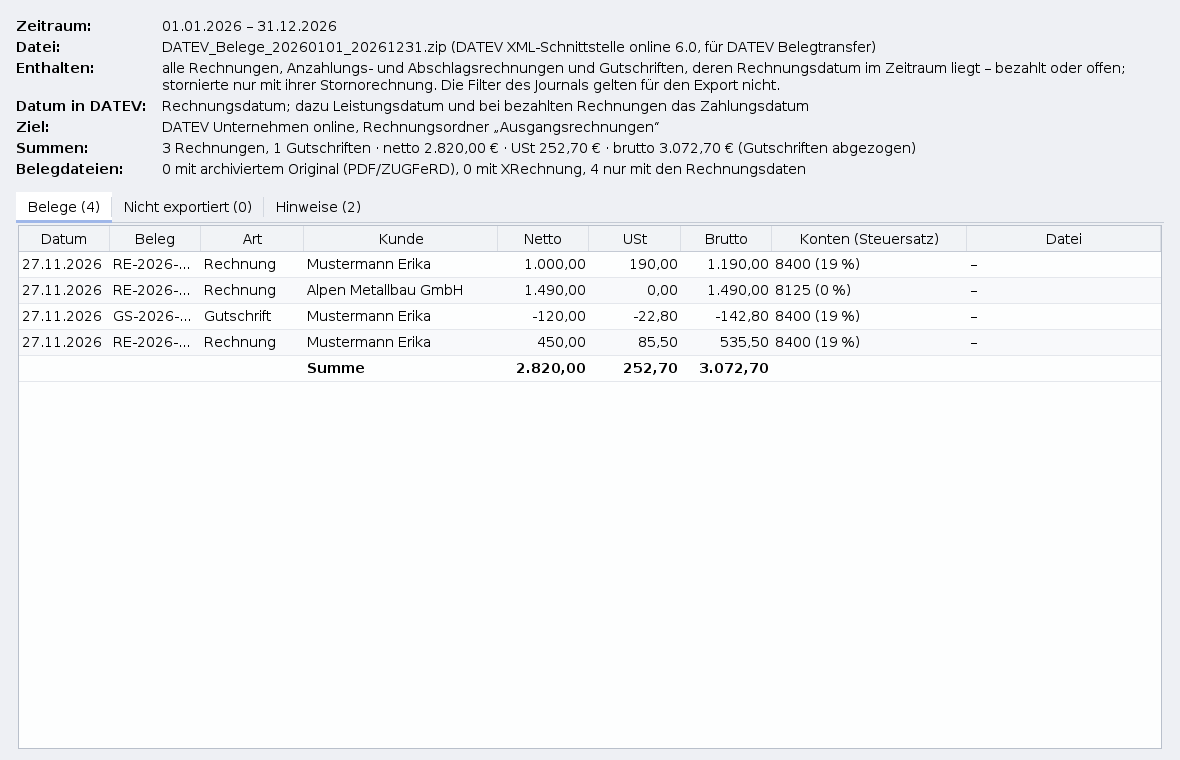
- Format & target: generates a ZIP archive
DATEV_Belege_<YYYYMMDD>_<YYYYMMDD>.zipfollowing the official DATEV XSD schemas of XML-Schnittstelle online (version 6.0) for DATEV Unternehmen online / Belege online (uploaded via DATEV Belegtransfer into the configured invoice folder, defaultAusgangsrechnungen). - No consultant/client number required: following DATEV's recommendation for XML-Schnittstelle online v6.0, consultant and client numbers are omitted from the package because the target client is selected during upload in DATEV Belegtransfer.
- Selection: all outgoing invoices, deposit/part-payment invoices, and credit notes whose invoice date falls in the selected period – regardless of payment status or Journal filters. Cancelled invoices are exported only together with their cancellation credit note (otherwise omitted and listed in the dialog).
- ZIP contents:
document.xml(document index),- one ledger XML file per invoice/credit note (
accountsReceivableLedger,Rechnungsdaten_RA_….xml/Rechnungskorrektur_RAK_….xml) with the exact same tax-rate split, revenue accounts, and BU keys as the booking batch, plus invoice date, service date, and (when paid) payment date, - one document file per invoice: prefers the archived original (PDF, ZUGFeRD, or XRechnung, e.g. archived by the GoBD plugin); for e-invoice customers without an archived original, includes the generated XRechnung XML (never a second diverging "original").
- Validation & DATEV limits: uses the preview and validation dialog (net/VAT/gross totals, Belege, Not exported, and Notes tabs including SKR03/SKR04 consistency checks, plus a direct Settings… button). Files over 20 MB (DATEV limit) are reported; packages exceeding DATEV's document count limit or 100 MB trigger warnings or block export.
- Note: built according to the official DATEV sample files and XSD schemas (v6.0), not certified by DATEV – please review the first import together with your tax adviser.
2. DATEV booking batch (EXTF-CSV – Kanzlei-Rechnungswesen)¶
Available via Journal › Export › DATEV-Buchungsstapel (EXTF-CSV – Kanzlei-Rechnungswesen) or directly for the current year via Plugins › DATEV: Buchungsstapel exportieren (aktuelles Jahr).
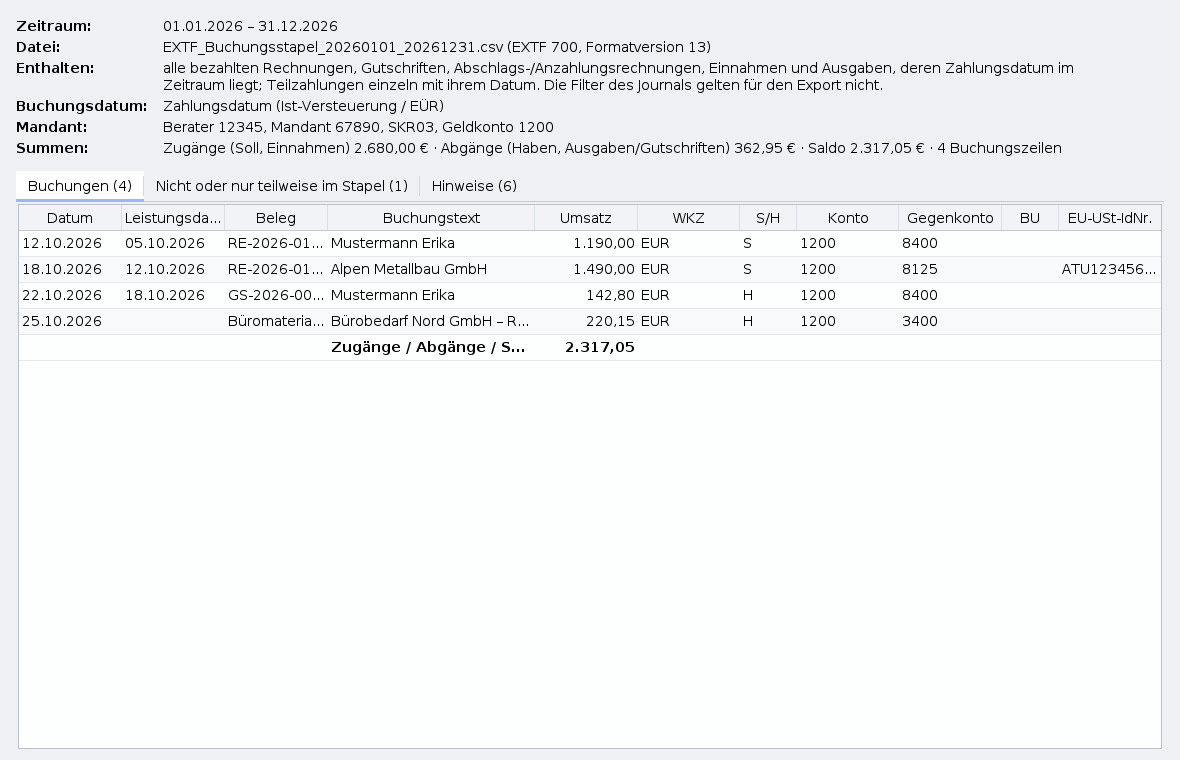
- Complete & independent of journal filters: reloads all documents of the selected period (by payment date or document date as configured in DATEV settings). Active search or table filters in the Journal do not affect the export.
- Preview & validation dialog: before saving, the dialog displays the period, file name, selection rule, client metadata, totals (debits, credits, balance, line count), and three tabs: Bookings (including service date, currency, account/offset account, BU key, EU VAT ID), Not or only partially included (stating the exact reason for each omitted document, e.g. open, cancelled, paid in another period), and Notes (including SKR03/SKR04 consistency checks and a direct Settings… button).
- Blocking error checks: errors that would cause DATEV import failures or invalid bookings (such as missing/invalid consultant or client number, booking date outside the batch period, account number exceeding configured length, document number exceeding 36 characters, or foreign currency without exchange rate/base amount) block saving. In the tax-adviser ZIP package, an invalid batch is rejected with an error message rather than bundled silently.
- File format & encoding:
EXTF_Buchungsstapel_<YYYYMMDD>_<YYYYMMDD>.csvin Windows-1252, CRLF, semicolon-separated, decimal comma, quoted text. Text is NFC-normalized and safely sanitized for Windows-1252 (umlauts in document numbers are transliterated rather than dropped; control characters and non-CP1252 emojis are safely stripped). - Booking rules:
- Exports paid, booking-relevant records only (invoices, deposit/part-payment invoices, credit notes, income, expenses, and individual partial payments with their payment date) – never cancelled or unpaid documents.
- Multi-rate documents (including line and overall discounts) and partial payments are split exact to the cent by tax rate and 0 % VAT category.
- Credit notes and cancellation invoices cleanly reverse the debit/credit indicator (
H) without double sign inversion. - Foreign currencies: exports
WKZ Umsatz,Kurs,Basis-Umsatz, andWKZ Basis-Umsatz(columns 3–6) per the EXTF specification. - GoBD traceability & export audit log:
- Every booking line carries a deterministic Buchungs-GUID (column 103) and, when available, a Beleglink (column 20, BEDI UUID) and Beleginfo linking back to the original document.
- Completed exports are recorded in the export audit log (file name, period, line count, SHA-256 checksum, and exported line keys). Re-exporting previously exported booking lines triggers a duplicate-import warning in the dialog.
- Tax-adviser ZIP package: while the plugin is active, the booking batch CSV is automatically added under
datev/EXTF_Buchungsstapel_<YYYYMMDD>_<YYYYMMDD>.csv(when error-free).
3. DATEV master data Debitoren/Kreditoren (EXTF-CSV – Kanzlei-Rechnungswesen)¶
Available via Journal › Export › DATEV-Stammdaten Debitoren/Kreditoren (EXTF-CSV – Kanzlei-Rechnungswesen).
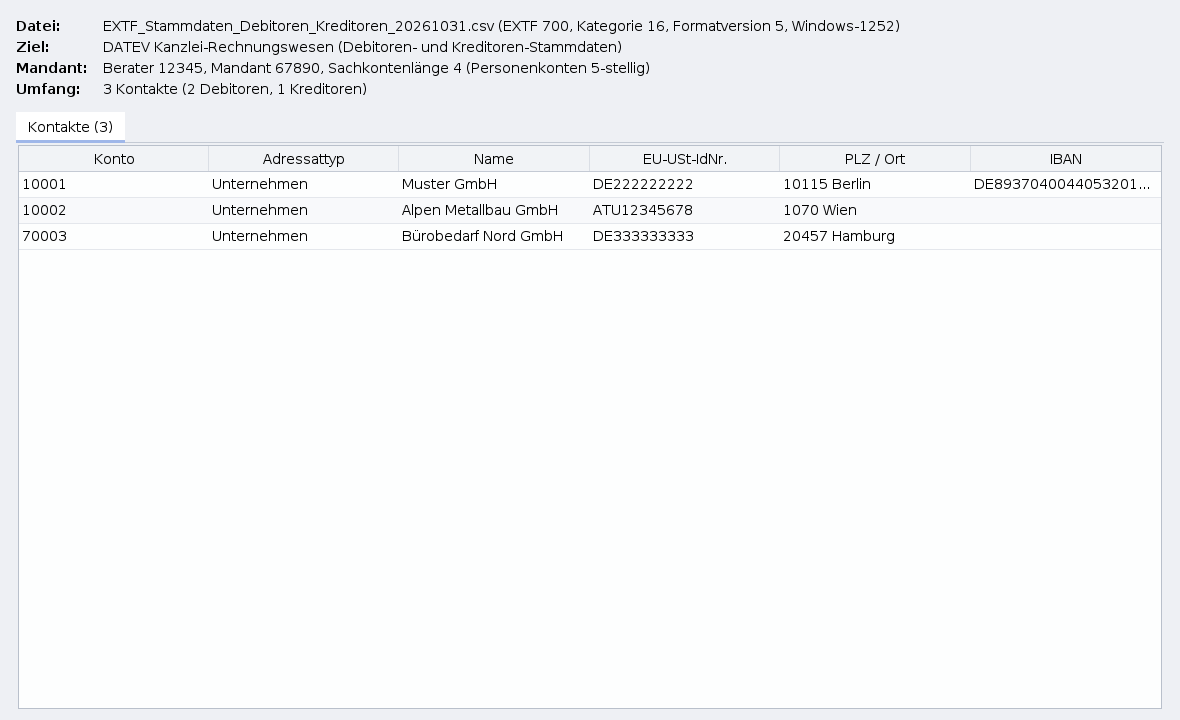
- Format: DATEV-Format EXTF 700, format category 16, format version 5, Windows-1252, CRLF, semicolon-separated, 51 columns.
- File name:
EXTF_Stammdaten_Debitoren_Kreditoren_<YYYYMMDD>.csv. - Preview & validation dialog: before saving, displays the number of debtors and creditors, all contacts to be exported (account, type, addressee type, name, EU VAT ID, postal code/city, IBAN), any omitted entries, warnings/errors (including consultant/client number validation), and a direct Settings… button.
- Contents: exports customers (debtors / Debitoren, e.g.
10000–69999) and suppliers (creditors / Kreditoren, e.g.70000–99999) with account numbers of lengthSachkontenlänge + 1, proper addressee type (Adressattyp) (1= natural person,2= company), names, postal address, EU country & VAT ID (includingELfor Greece), contact details, and bank account data (IBAN, SWIFT/BIC with the mandatory empty column 46).
Importing into DATEV¶
- Do not open and re-save the CSV files in Excel (Excel alters the header, delimiters, leading zeros, and number formatting).
- DATEV Unternehmen online (document package ZIP): upload via DATEV Belegtransfer to the configured folder (default
Ausgangsrechnungen). - DATEV Kanzlei-Rechnungswesen (booking batch & master data): import via Bestand › Importieren › Stapelverarbeitung.